
Boot Flow chart V1.04
IPC@Chip Documentation Index
- This page describes the boot process and its error handling of the IPC@CHIP.
Also a list of all possible errors while boot up is attached.
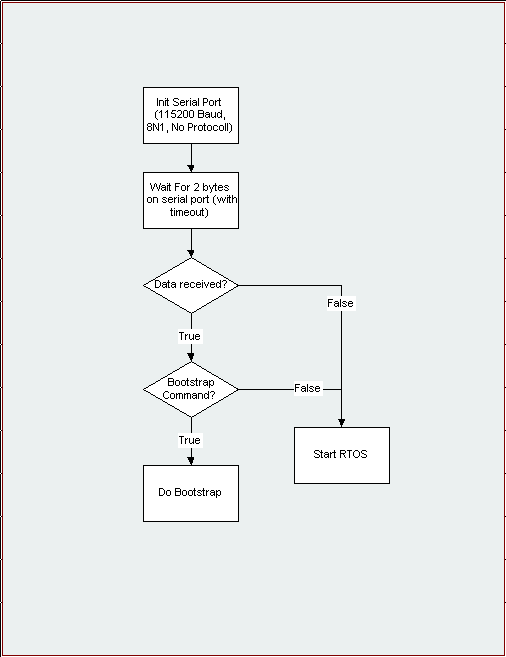
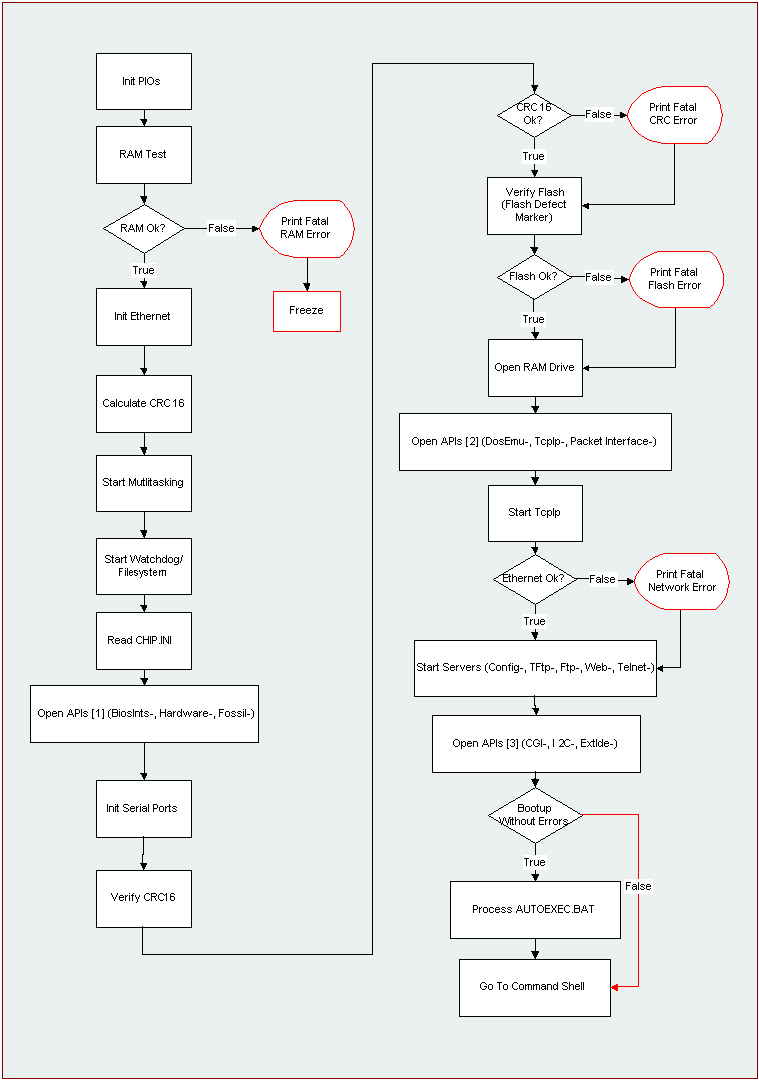
The boot process consits two steps. In the first step the Bootloader will be executed. It checks on the serial EXT port if an @CHIP-RTOS update request comes in (from CHIPTOOL). If not the bootloader goes to the second step by jumping into the @CHIP-RTOS startup code. Below there are the flow charts of Step one (Bootloader) and Step two (@CHIP-RTOS)
The errors in the diagrams will be described in the next point (Possible Error while the boot process )
- Boot Flow Chart of the @CHIPs Bootloader:
- Boot Flow Chart of the @CHIP-RTOS:
- Boot Flow Chart of the @CHIPs Bootloader:
Top of list
Index page
Possible Error while the boot process
While the boot process there could be occur some errors. All possible errors are mentioned in the list below. They does prevent the start of the AUTOEXEC.BAT, so your application will not start automaticly (to prevent fatal errors while runtime). The error which was occured will be print on the Command Shell via the COM Port.- RAM Error:
On startup of the @CHIP-RTOS a RAM Test will be performed. If it fails, the @CHIP prints the Error Message "RAM ERROR" on the COM Port (using 19200 Baud and 8N1, unexpected the entry in the CHIP.INI). The @CHIP-RTOS freezes after the message output (does not boot!). - Checksum Error:
While the boot process a checksum over the complete @CHIP-RTOS code in the flash will be generated. This checksum must be equal to the checksum which was written with the @CHIP-RTOS update (in a special sector on the flash). If the checksum is not equal, the error message "Fatal BIOS checksum error" will be shown on the serial console. The system will boot, but the execution of the AUOEXEC.BAT will be prevented. - Flash Error:
Every flash write flash access of the @CHIP-RTOS will be verified. If the flash access fails, an internal flasg will be set, to mark the sector which should be written as defect. On the next reboot the error message "Flash error at sector: xx" will be shown on the serial console. The system will boot, but the execution of the AUOEXEC.BAT will be prevented. - Network Error:
While the Init process of the TCPIP it could be possible that a network error occurs (mostly it is a hardware defect). In this case the message "Fatal Network Error" will be print on the serial console of the IPC@CHIP. The system will boot, but the execution of the AUOEXEC.BAT will be prevented.
- RAM Error:
Top of list
Index page
End of document